php2shell: The PHP Bug That Strikes Before Your Code Even Runs
On this page
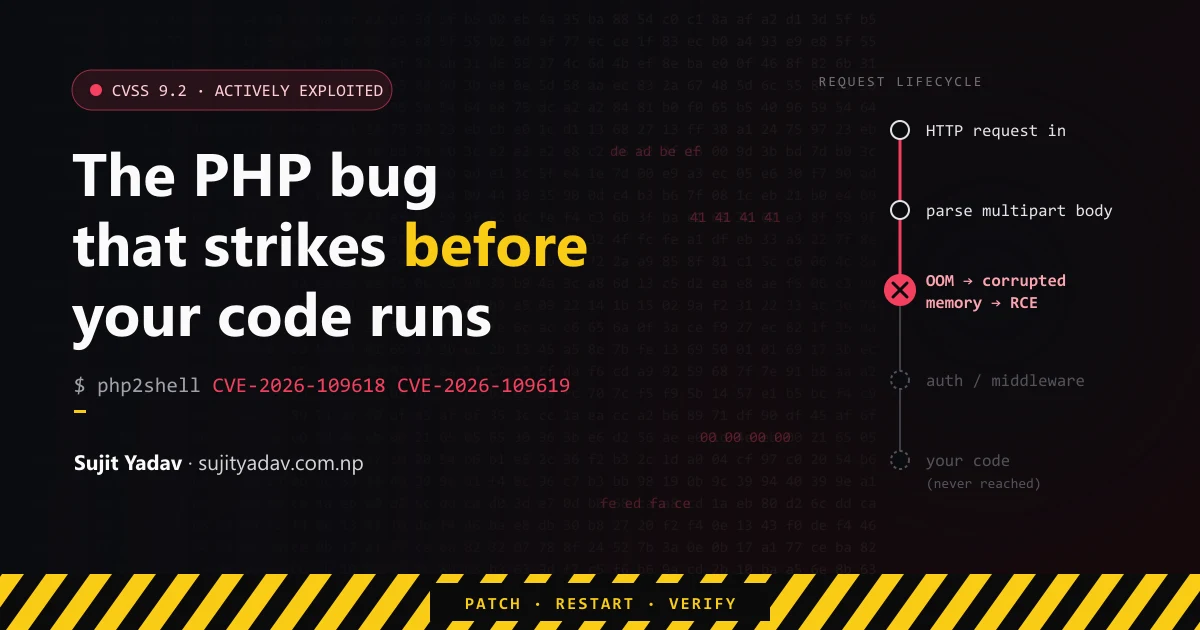
On 21 October 2026 the PHP project shipped emergency releases for two critical vulnerabilities in the PHP runtime itself: CVE-2026-109618 and CVE-2026-109619. Researchers call the chain php2shell. Both are rated CVSS 9.2. Both can give an unauthenticated attacker remote code execution. One of them can fire before a single line of your application runs.
I'm a frontend developer, not a security researcher. But a large share of what frontends talk to
runs on PHP: WordPress and Drupal installs, Laravel APIs, headless CMS backends, the small
contact.php on shared hosting that nobody has looked at in years. When the advisories
dropped, I read them end to end. This post is what I wish someone had handed me that morning: what
actually broke, who is exposed, and what to do in what order.
Short version: upgrade to PHP 8.5.12, 8.4.27, 8.3.36 or 8.2.35 (or your vendor's patched build), restart every PHP worker, then confirm the version your web server is running, not the one your terminal reports. Configuration tweaks only reduce risk. The PHP project is explicit that updating is the only complete fix.
What happened, and when
This was not a calm, coordinated disclosure. The timeline matters, because it explains why the patch window was so short:
| Date (2026) | Event |
|---|---|
| 17 October | Amazon Threat Intelligence records a php2shell exploitation attempt against its honeypot network, four days before public disclosure. |
| 20 October | Details leak publicly ahead of the embargo. The PHP project announces an advance release and moves it up a day. |
| 21 October, 14:00 UTC | Official advisories and patched releases for PHP 8.2 through 8.5. |
| 21–22 October | Public write-ups demonstrate working RCE paths, including against WordPress, Drupal and Joomla sites. Security vendors report exploitation attempts in the wild. |
One practical warning: the leaked pre-release write-ups got important details wrong (including a CVSS score of 10.0; the official score is 9.2). If you read something about php2shell dated before 21 October, check it against the official advisories linked at the end of this post.
Why a runtime bug is worse than an application bug
Most vulnerabilities we hear about live in application code: an SQL injection in a plugin, a missing auth check on an endpoint. Those are bad, but they have a boundary. The attacker has to find the vulnerable route, and your middleware, WAF rules and authentication still run first.
php2shell lives one layer down, in the interpreter. Before PHP hands a request to your code, it
has already done real work: parsing headers, decoding the body, building $_POST and
$_FILES, applying configuration. If the runtime is unsafe during that phase, none of
your application's defences have started yet. Your login check cannot protect you from code that runs
before the login check exists.
CVE-2026-109618: memory corruption when PHP runs out of memory
The official advisory title is "RCE via OOM corruption."
The mechanism
PHP caps each request's memory with memory_limit (128 MB by default). When an
allocation would cross that limit, PHP has to abandon the request. Until this fix, it did that with
longjmp(): a C-level jump that unwinds straight out of whatever the engine was doing,
mid-function, with no cleanup along the way.
That's fine if every data structure the engine touches is always in a consistent state. It isn't. During request processing there are moments where memory has been allocated and is reachable, but is not yet fully initialised. If the out-of-memory jump happens in that window, the request shutdown code later walks over half-built structures, reading pointers that were never set. That is memory corruption, and with careful shaping it becomes code execution.
1. Attacker sends a crafted multipart request
2. PHP starts parsing it and allocating memory
3. An allocation crosses memory_limit mid-initialisation
4. longjmp() exits immediately, leaving structures half-built
5. Request shutdown processes the invalid state
6. Memory corruption → attacker-controlled execution
The bug isn't that PHP can run out of memory. Every runtime can. The bug is that one specific failure path wasn't safe.
How a small request exhausts memory
You'd think post_max_size prevents this. The advisory explains why it doesn't. A
multipart body can expand far beyond its raw size once PHP parses it:
- A multipart request with no usable declared content length can pass the initial
post_max_sizecheck. - Each part can carry an unrestricted number of headers, and each one expands in PHP's memory.
- Empty file controls don't count toward
max_file_uploads, but still create file metadata arrays. Nested field names multiply that work.
Where it bites hardest: Apache mod_php
Under Apache with mod_php, request shutdown runs unconditionally, even when request
startup failed. Body parsing happens during startup. The advisory says plainly that this sequence
"happens entirely before any application-specific code begins execution," and that full RCE was
validated over HTTP against mod_php with default input and memory limits.
PHP-FPM behaves differently. When startup fails, the FPM child exits, so the same sequence doesn't survive. An out-of-memory condition reached later, inside application code, may still be exploitable, but no complete FPM exploit had been demonstrated at disclosure. FrankenPHP is likely susceptible by source analysis, and LiteSpeed's LSAPI resembles FPM. Neither was validated.
The fix
The patch removes longjmp() for out-of-memory handling entirely. Crossing the limit
now triggers a "soft" OOM that waits for the next safe point in the VM before stopping, plus a hard
limit at a higher threshold that kills the process outright with _exit() instead of
trying to unwind.
CVE-2026-109619: a use-after-free through stale global state
The official advisory title is "RCE via stale global state." This one is subtler, and the original reports undersold how broad it is.
What a use-after-free is
In C, freeing memory doesn't erase the pointers that referred to it. They still hold the old address. If anything uses one of them later, it's reading memory that may now belong to something else entirely:
char *data = allocate_memory();
free(data);

/* Wrong: data still holds the old address, but the memory
   may already have been reused for another object. */
process(data);
If an attacker can control what gets allocated into that reused slot, they can control what the stale pointer "sees", and from there, what the program does.
How PHP gets there: a producer and a consumer
A PHP worker (an Apache child or an FPM process) serves many requests over its lifetime. Each request gets its own memory, which is thrown away when the request ends. But PHP also keeps global state (error state, session state, object and extension state) that outlives requests. The bug is that certain paths leave that global state pointing into request memory that has already been freed.
Exploitation needs two halves, and they must land on the same worker:
- A producer: a request that leaves the dangling reference behind. Fatal errors
do it, including parse errors, uncaught errors, failed
requireand "Maximum execution time exceeded." So does running out of memory, which links this CVE to the first one. - A consumer: a later request whose early processing touches that stale state before normal initialisation resets it.
The two consumers worth knowing
Configuration diagnostics before request startup. Any warning, notice or
deprecation raised while PHP applies per-request configuration counts, even if it's never displayed
or logged. Under mod_php, .htaccess files and Apache php_value /
php_flag directives are applied before request startup. An invalid
date.timezone or a deprecated setting is enough. The advisory is blunt that the usual
reflexes don't help: "Changing error_reporting, using @, or disabling
display_errors or log_errors does not protect against this
vulnerability."
Session upload progress. This feature is enabled by default, and it
doesn't require your code to call session_start(). The confirmed chain uses an
out-of-memory condition during input processing as the producer and session upload progress as the
consumer. It was validated against both mod_php and a normal dynamic FPM pool, though the FPM
version depends on a suitable application operation.
On PHP 8.5 there is one more confirmed path: the new fatal_error_backtraces feature.
The advisory calls it "the strongest demonstrated case" and the basis of the confirmed mod_php
exploit.
The fix
The patch makes PHP fully reset this global state between requests, so no reference can outlive the memory it points to. That's the memory-safety rule the whole bug violated.
Am I affected?
| Setup | Exposure |
|---|---|
| Apache + mod_php | Highest. Both CVEs have demonstrated RCE. The 109618 path runs before your code. |
| PHP-FPM (behind Nginx or Apache) | Affected. The 109619 session chain was validated on FPM. No complete FPM exploit for 109618 at disclosure, but don't rely on that. |
| FrankenPHP, LiteSpeed (LSAPI) | Likely affected by source analysis, not validated. Patch anyway. |
| Docker / Kubernetes | A container doesn't patch the binary inside it. Rebuild on a fixed base image and redeploy. |
| Managed WordPress / shared hosting | Your host owns the runtime. Confirm with them in writing. WordPress itself needs no update; WordPress.org has said none is planned for these issues. |
| Static frontend (Netlify, Vercel, S3) | Not affected by itself, but check what it calls. A headless CMS, a form handler or a PHP API behind your SPA is in scope. |
The vulnerable code goes back a long way. The earliest affected path that researchers found dates to PHP 5.4.0. Every release before the fixed versions below is affected.
Patched versions
| Branch | Fixed in |
|---|---|
| PHP 8.5 | 8.5.12 |
| PHP 8.4 | 8.4.27 |
| PHP 8.3 | 8.3.36 |
| PHP 8.2 | 8.2.35 |
| PHP 7.4 – 8.1 | No official release. The PHP security team published minimal source-only backports. Check your OS vendor for a packaged fix. |
| PHP 5.4 – 7.3 | No fix. Upgrade, or take the service off the public internet. |
Linux distributions often backport fixes without changing the upstream version number. An Ubuntu or RHEL package can be patched while reporting an "old" version, so check your vendor's security tracker rather than the version string alone.
The response checklist, in order
- Inventory. List every place PHP runs: web servers, containers, staging boxes, that old internal tool, third-party appliances. Vendors including Cisco and Palo Alto Networks have published their own advisories for products that embed PHP.
- Patch. Install the fixed release or your vendor's patched package. Rebuild container images instead of patching running containers.
- Restart every worker. An updated binary on disk does nothing while old Apache children or FPM workers keep running the vulnerable code in memory. Restart Apache or PHP-FPM, not just reload.
- Verify the runtime that serves HTTP. See the next section. This is the step people skip.
- Look for compromise. If the server was exposed while vulnerable (and from 17 October, assume it was), review access logs for unusual multipart requests, check for new or modified PHP files, unfamiliar processes and cron jobs, and unexpected outbound connections.
- Rotate secrets if in doubt. One demonstrated path discloses memory containing
passwords, tokens and API keys. If compromise is plausible, rotate database credentials, API keys
and anything in
.envfiles the worker could read.
Patching closes the door. It doesn't remove anyone who already walked through it.
Verify what your web server is actually running
php -v tells you about the command-line PHP. Apache's module or your FPM pool can be
a completely different build. Check each one directly:
# Which PHP is loaded into Apache?
apachectl -M | grep -i php

# FPM binary version (the name varies: php-fpm, php-fpm8.3, php-fpm83)
php-fpm8.3 -v

# Is the version leaked in headers? (Often disabled, which is good)
curl -sI https://your-site.example | grep -i x-powered-by
The most reliable check goes through the web server itself. Drop a temporary file with a random name into the document root, request it once, then delete it immediately:
<?php
// Temporary check. Delete after use.
header('Content-Type: text/plain');
echo PHP_VERSION, ' via ', PHP_SAPI;
If that prints 8.3.36 via fpm-fcgi, the code serving your traffic is patched. If it
prints anything older, a worker is still running the old binary, or the web server points at a
different install than the one you upgraded.
If you can't patch today: interim mitigations
These reduce risk while you schedule the upgrade. None of them is a fix. Apply them
administratively (in php.ini or the FPM pool, where applications can't override them),
then restart every worker.
| CVE | Mitigation | Caveat |
|---|---|---|
| 109618 | memory_limit=-1, the advisory's primary configuration mitigation |
Removes a resource-exhaustion safeguard. PHP can still take the unsafe path if a lower-level
allocation (like mmap()) fails. Check that no pool, directory or app setting brings a
finite limit back. |
| 109618 | Keep post_max_size conservative and enforce decoded request size at the proxy.
Reduce max_input_nesting_level. Bound input variables, multipart parts, headers per
part and uploads. |
Narrows the known trigger, not the underlying bug. |
| 109618 | If your app doesn't accept multipart form data, block it at the frontend proxy or WAF. | Breaks file uploads, so only for apps that don't take them. |
| 109618 | A container or cgroup memory cap (memory.max) as an alternative bound. |
Hitting it can kill the FPM master and every worker. The advisory says not to use
RLIMIT_AS or RLIMIT_DATA. |
| 109619 | session.upload_progress.enabled=0 |
Closes the confirmed session chain. Worth keeping off after patching if you don't use the feature. |
| 109619 | fatal_error_backtraces=0 (PHP 8.5 only) |
Closes the strongest demonstrated path on 8.5. |
| 109619 | Remove fatal errors from attacker-reachable paths. Avoid per-request config overrides
(.htaccess, php_value) that raise diagnostics. Consider
pm.max_requests=1 on FPM. |
The advisory states there is no complete generic configuration mitigation for this CVE.
pm.max_requests=1 stops state surviving between requests but costs throughput. |
A minimal interim php.ini block, if you've confirmed your app tolerates it:
; php2shell interim mitigations. Remove once patched (keep upload_progress off if unused).
memory_limit = -1
session.upload_progress.enabled = 0
; PHP 8.5 only:
fatal_error_backtraces = 0
Don't treat memory_limit = -1 as something to leave in place. It trades a
code-execution bug for an easy way to exhaust the server's memory. It's a bridge to the patch, not a
destination.
What I'm taking away from this
Your runtime is part of your application. We review our own code and audit our npm or Composer dependencies, then treat the interpreter as a given. php2shell is a reminder that the layer under your code has an attack surface too, and it runs first.
Error paths are code paths. Both bugs sit in failure handling: what happens when memory runs out, what's left behind when a request dies. Those paths get far less testing than the happy path, and attackers know it.
"Installed" is not "running." The most common gap I expect from this incident is
a server where the package was upgraded and the workers were never restarted, or where
php -v said one thing and the web server ran another. Verify through HTTP.
Know where your stack ends. If you build frontends, you probably don't run the PHP servers yourself. But you should know whether your site depends on one: the CMS behind your Next.js build, the API your Angular app calls, the form handler on the marketing site. Those are worth a message to whoever owns them this week.
Sources
- PHP advisory GHSA-w8hw-w9fx-j79w: RCE via OOM corruption (CVE-2026-109618)
- PHP advisory GHSA-6wmf-4rv5-p3rp: RCE via stale global state (CVE-2026-109619)
- Tenable: php2shell frequently asked questions
- Huntress: Rapid response to the leaked php2shell vulnerabilities
Facts in this post are taken from the official advisories and vendor reports as of 23 October 2026. Exploitation status changes quickly, so check the advisories for the latest. If you need a frontend developer who reads the fine print, get in touch.