React 19 Patterns: 6 Patterns That Replaced My Old React Habits
On this page
I've been writing React for six years. That turned out to be the problem.
The first feature I built on React 19 was a user list. I wrote it in four minutes, without thinking, because I've written this exact component in every project since 2019:
"use client";

export default function Users() {
  const [users, setUsers] = useState([]);

  useEffect(() => {
    fetch("/api/users")
      .then((res) => res.json())
      .then(setUsers);
  }, []);

  return users.map((user) => <p key={user.id}>{user.name}</p>);
}
It worked. It also shipped a component, a hook, a fetch client, and a loading state to the browser to render eleven names — and the names didn't appear until a round trip after the page had already painted.
Here's the uncomfortable part: that component isn't bad React. It was the correct answer for most of the time I've been writing React. Fetch in an effect, hold it in state, render. That's what the docs said. That's what I taught juniors. Six years of it being right is exactly why I stopped seeing it.
Below are the six React 19 patterns that replaced those reflexes, in the order they bit me — with the mistakes attached, because the mistakes are what make them stick.
Who This Is For
- React developers with 2+ years who have
useState+useEffectdata fetching in muscle memory. - Teams evaluating or mid-migration to the Next.js App Router or React Router v7 — my own move from Angular to Next.js covers the framework-level side of that decision.
- Anyone who has read the React 19 release notes and wants the failure modes, not the feature list.
Not for you if you're on a client-only Vite SPA with no server. Patterns 1, 2, and 5 need a framework with an RSC-aware bundler. Patterns 3, 4, and 6 still apply.
The Mental Model: Two Component Worlds
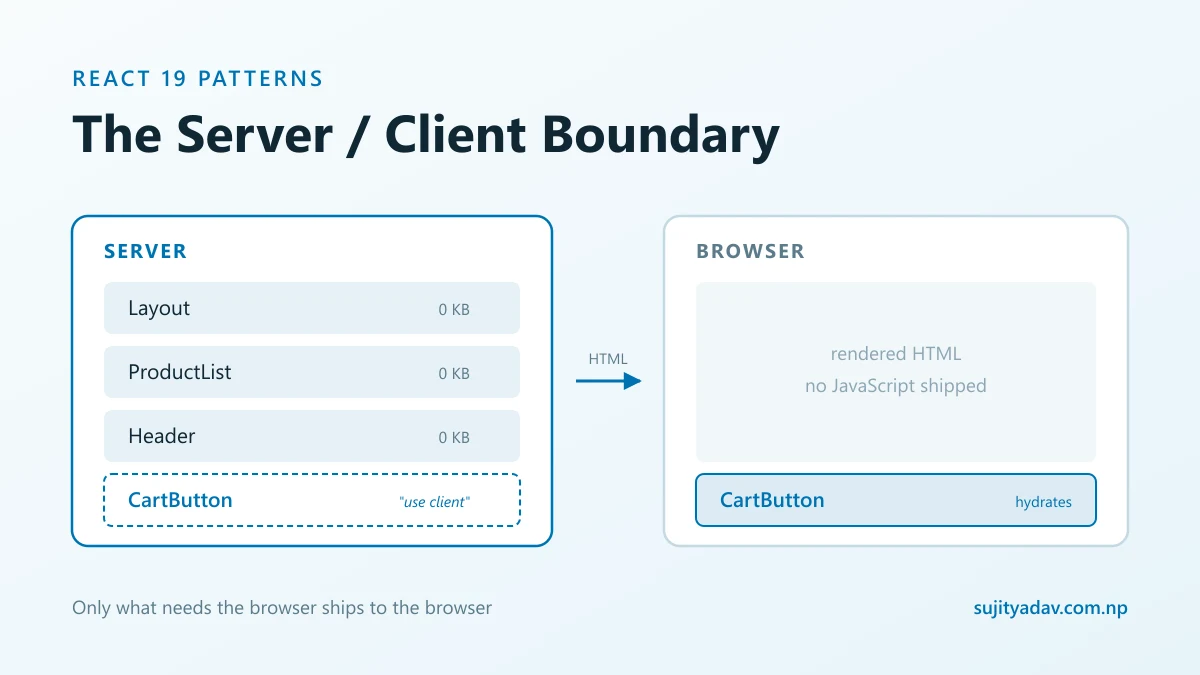
Every React 19 pattern below follows from one diagram. "use client" isn't ceremony —
it's a boundary, and everything below it ships to the browser.
                 ┌──────────────── SERVER ────────────────┐
                 │                                        │
Request  ──────► │   Layout        (Server Component)     │
                 │     ├── Header      (Server)           │
                 │     ├── ProductList (Server) ── await db.query()
                 │     └── CartButton  ◄── "use client"   │
                 │            │                           │
                 └────────────┼───────────────────────────┘
                              │  ▼ RSC payload + HTML
                 ┌────────────┼──── BROWSER ──────────────┐
                 │            ▼                           │
                 │   CartButton hydrates  (only this)     │
                 │   Header, ProductList: HTML only,      │
                 │   zero JS shipped                      │
                 └────────────────────────────────────────┘
Three questions decide which side a component lives on:
- Does it need an event handler?
- Does it need state that survives a render?
- Does it need a browser API —
localStorage,window,IntersectionObserver?
All three no → it stays on the server. The surprise is how often all three are no.
Pattern 1: Server Components by Default
I put "use client" at the top of every file for two weeks. Not laziness — a mental
model built over six years in which every component is a client component. There was no
other kind.
The same list, server-side:
export default async function Users() {
  const users = await getUsers();

  return users.map((user) => <p key={user.id}>{user.name}</p>);
}
The component is async and awaits its data directly. No hook, no loading state, and
none of it reaches the browser.
The pitfall that cost me the most: I assumed a client component poisons
everything under it. It doesn't. A client component can still render server-rendered
children passed as props, including children. So wrap, don't convert:
// ❌ Whole subtree becomes client code
<ClientTabs><ProductList /></ClientTabs>   // inside a "use client" file

// ✅ ProductList stays a Server Component, passed through as children
<ClientTabs>{<ProductList />}</ClientTabs> // composed in a Server Component
That one refactor of a layout component roughly halved a page's client bundle.
When NOT to Use Server Components
- Highly interactive surfaces — editors, canvases, drag-and-drop, anything with per-keystroke state. The round trip costs more than the JS you saved.
- Personalized content on a static route. Server Components read data at request time; if you want the page cached at the edge, fetch the personalized slice on the client instead.
- Hard dependencies on browser APIs. A wallet connection is the clearest case —
a MetaMask login needs
window.ethereum, so that subtree is client-side by definition, no matter how much of the page around it stays on the server. - No RSC-capable framework. Not available on a plain Vite SPA.
- Deep prop-drilling for one leaf. If pushing the boundary down means threading props through five layers, a small client subtree is the cleaner call.
Pattern 2: Actions Instead of Hand-Rolled Submit Pipelines
I have written this form skeleton in every React project I've shipped. Different variable names, same twelve lines — at one point I kept it in a snippet file:
const [loading, setLoading] = useState(false);
const [error, setError] = useState("");

async function onSubmit(e) {
  e.preventDefault();
  setLoading(true);
  setError("");
  try {
    await fetch("/api/users", { method: "POST", body: new FormData(e.target) });
  } catch (err) {
    setError(err.message);
  } finally {
    setLoading(false);
  }
}
React 19 lets the form call server logic directly:
"use server";

export async function createUser(prevState, formData: FormData) {
  const name = formData.get("name") as string;
  if (!name?.trim()) return { success: false, error: "Name is required." };

  await db.user.create({ data: { name } });
  revalidatePath("/users");
  return { success: true, error: null };
}
Two things I got wrong on the first attempt. The "use server"
directive is mandatory — without it you get an opaque serialization error at build time, not a
helpful one. And revalidatePath is what refreshes the UI. I skipped it, the write
succeeded, the list kept showing stale data, and I spent an embarrassing amount of time blaming the
database.
Pattern 3: useActionState for Form State
"use client";

const [state, formAction, isPending] = useActionState(createUser, {
  success: false,
  error: null,
});

return (
  <form action={formAction}>
    <input name="name" />
    <button disabled={isPending}>{isPending ? "Saving…" : "Save"}</button>
    {state.error && <p role="alert">{state.error}</p>}
  </form>
);
useActionState returns three values, and the third is the reason to use it.
isPending is the loading boolean I'd been declaring by hand since 2019,
wired to the right lifecycle for free. Most write-ups show only the first two — which is how I missed
it for a week and kept my own setLoading alongside the hook, the worst of both
worlds.
The underrated win: this form submits without JavaScript. A form with an
action prop is a real form post. Every version I wrote for six years was a
preventDefault on a dead page.
How a Request Actually Flows
User submits <form action={formAction}>
      │
      ├─ JS loaded? ──► React intercepts, POSTs to Server Action
      │                              │
      └─ JS failed?  ──► native form POST (still works)
                                     │
                                     ▼
                        ┌────────────────────────┐
                        │  createUser()          │
                        │  "use server"          │
                        │   1. validate          │
                        │   2. db.user.create()  │
                        │   3. revalidatePath()  │─── skip this
                        └────────────┬───────────┘    and the UI
                                     │                lies to you
                  ┌──────────────────┴──────────────┐
                  ▼                                 ▼
       return { error } ──► state.error    re-render affected
       isPending flips false               Server Components,
                                           stream RSC payload down
Pattern 4: Suspense and use() Instead of Loading Flags
The line if (loading) return <Spinner /> appeared in nine components on that
project. Nine booleans, nine slightly different spinners, nine chances to forget the error branch.
In fairness to my past self: before Suspense worked for data, there was no other
option.
Now waiting is a property of the boundary:
<Suspense fallback={<DashboardSkeleton />}>
  <Dashboard />
</Suspense>
Dashboard no longer knows it can be slow. On the server this streams — the shell
paints immediately, each boundary fills in as its data lands.
For client components, use() unwraps a promise:
const user = use(userPromise);The trap that cost me an afternoon: use() re-reads the promise on
every render. Create the promise inside the client component and every render makes a new
one → suspends → re-renders → new promise. Infinite loop, no warning, the tab just gets hot.
The promise must come from a Server Component or a cache.
Pattern 5: useOptimistic for Instant Feedback
Having discovered React 19 could make things feel instant, I put useOptimistic on
everything. Six years of watching users stare at spinners will do that.
The signature is what people copy wrong — the reducer takes two arguments:
const [optimisticLikes, addOptimisticLike] = useOptimistic(
  likes,
  (currentLikes, increment: number) => currentLikes + increment
);
React rolls the value back automatically if the request fails. On a like button that's great: trivial interaction, rare failure, invisible rollback.
Then I put it on a publish button.
Publishing failed a server-side validation rule I'd forgotten about. The user watched their post appear in the list, sit there for roughly 700ms, and vanish. No error — just a disappearance. They filed it as a data-loss bug, which from where they sat is exactly what it was.
When NOT to Use useOptimistic
The rule: optimistic updates are for actions that are cheap to undo and boring to get wrong. Skip it when:
- The rollback is visible and alarming — publishing, paying, deleting, submitting an application.
- Failure is common, not rare. A flaky endpoint turns optimism into flicker.
- The result isn't predictable client-side. If the server assigns an ID, price, or ordering you can't compute, you're guessing.
- The action is already fast. Under ~200ms, an honest spinner beats a lie.
Pattern 6: Fetch Where You Render
This one is subtle, and it came straight out of habits I'd been rewarded for. For years the advice
was to hoist fetching up — a route loader, a container component, one useEffect at the
top passing data down. It avoided duplicate requests and kept leaves pure.
In a Server Component, sequential awaits are exactly that: sequential. The pattern that used to prevent waterfalls now is the waterfall.
<Dashboard>
  <Suspense fallback={<CardSkeleton />}><Users /></Suspense>
  <Suspense fallback={<CardSkeleton />}><Orders /></Suspense>
  <Suspense fallback={<CardSkeleton />}><Products /></Suspense>
</Dashboard>
Queries now overlap, each card appears as its data arrives, and one slow endpoint delays one card instead of the page.
This also answers "how much state belongs on the client," which I'd overthought for years. Most of
my useState calls were caching server data so I could pass it around. Once each
component fetches what it renders, that state has nothing to hold. What's left is genuinely client
state: open menus, form drafts, a selected tab.
Old React vs React 19, Side by Side
| Task | React 16–18 | React 19 |
|---|---|---|
| Fetch data for a page | useEffect + useState + cleanup | async Server Component, await directly |
| Submit a form | preventDefault → fetch → 3 state vars | A form with an action prop |
| Track submit status | Manual setLoading(true/false) | isPending from useActionState |
| Show a loading state | if (loading) return <Spinner /> | <Suspense fallback> |
| Read a promise on the client | useEffect + state + cleanup | use(promise) |
| Instant UI feedback | Manual patch + manual rollback | useOptimistic (auto rollback) |
| Refresh after mutation | Refetch or hand-patch cache | revalidatePath / revalidateTag |
Example Impact Figures
These are illustrative example numbers from one internal dashboard route — a list page with four data panels, measured before and after migration. Treat them as a shape to expect, not a benchmark; your numbers depend on payload size, network, and how much of the page was interactive to begin with.
| Metric (example route) | React 18 SPA | React 19 server-first | Change |
|---|---|---|---|
| Route JS (gzipped) | ~186 KB | ~94 KB | −49% |
| TTFB | ~180 ms | ~210 ms | +30 ms |
| First contentful paint | ~1.4 s | ~0.6 s | −57% |
| Hydration time | ~320 ms | ~140 ms | −56% |
| Dashboard data (4 panels) | ~800 ms serial | ~240 ms streamed | −70% |
Note the TTFB going up. Server-first work moves data fetching before the first byte, so TTFB usually gets slightly worse while everything the user perceives gets better. If TTFB is your only dashboard metric, this migration will look like a regression.
Every One of These Habits Was Correct Once
None of the "before" code above is bad React. Fetching in useEffect was the
documented approach. Container components existed because prop-drilling from one fetch point was the
sane way to avoid duplicate requests. Manual loading flags existed because Suspense couldn't do
data.
This isn't the first time it's happened to me. I wrote enthusiastically about Gatsby when its build-time GraphQL layer was the best answer available for static React sites. It was correct then. The industry moved, and the habits it taught me took longer to unlearn than the tool took to fall out of favour.
That's what makes them hard to see. A bad habit announces itself — you feel the friction.
A habit that used to be correct feels like competence. Six years in, I wasn't
choosing useState + useEffect for that user list. I wasn't choosing anything
at all, and that's the actual failure mode.
When a framework you know well ships a major release, the risky code isn't the part you look up. It's the part you write without pausing.
Migration Roadmap: React 18 SPA → React 19 Patterns
Do not big-bang this. This is the order I've used on production React and Angular codebases — see the work I've shipped — and it's six steps, each independently shippable:
- Upgrade in place. Move to React 19 on your existing setup. Run the codemods,
fix
refcleanup and removed legacy APIs. Ship. No new patterns yet. - Adopt Actions on one form. Pick your most annoying form. Replace the submit
pipeline with a form
action+useActionState. This works before any RSC migration and deletes real code. - Introduce Suspense boundaries. Replace
if (loading)with boundaries around slow subtrees. Still client-only — you're just moving where waiting is expressed. - Move one leaf route to the App Router. Choose a low-risk, read-heavy page — a
list or detail view. Keep everything
"use client"at first so it behaves identically. Measure the bundle. - Push the client boundary down. On that route, strip
"use client"from anything failing the three questions. Re-measure. This is the step that produces the bundle number. - Distribute the fetching. Break the top-level
awaitchain into per-component fetches behind Suspense boundaries. Then delete the client state that existed only to pass server data around.
Steps 2 and 3 pay off even if you never adopt Server Components at all.
The Six-Pattern Checklist
- Server Components by default.
"use client"only for event handlers, persistent state, or browser APIs — and push the boundary as far down as it goes. - Actions for mutations. A form
action+"use server", and never forgetrevalidatePath. - useActionState for form state. Destructure all three values;
isPendingreplaces your loading boolean. - Suspense + use() for async. Waiting belongs to the boundary. Create promises where they're stable.
- useOptimistic where rollback is cheap. Likes yes; publishing, payments, deletes no.
- Fetch where you render. Hoisting fetches used to prevent waterfalls; in Server Components it creates them.
None of these are things I read and understood. They're all things I shipped wrong first — after six years of writing React — which is why they're worth writing down.
React 19 isn't a bag of new hooks. It's an argument that most of the state, effects, and JavaScript we've been shipping don't need to exist. The longer you've written React, the more of that code is yours, and the harder the argument is to hear. Pick one route, move it server-first, measure the bundle before and after. The number is more persuasive than any blog post, including this one.
References
- React 19 release announcement — official changelog and upgrade notes
- use — reading promises and context during render
- useActionState — full three-value signature
- useOptimistic — reducer signature and rollback behavior
- Suspense — boundaries, streaming, and nesting
- Server Components and Server Functions — the RSC model
- Next.js: Data Fetching and Server Actions — App Router specifics
I'm Sujit Yadav, a senior frontend developer working across React, Next.js, and Angular — see the work I've shipped or get in touch about a project.
Originally published on LinkedIn — read the original article.